Beiträge von nuxubee

    Jetzt ist schon sehr übersichtlich geworden:

    Die bereinigte Repoliste schaut jetzt so aus:

    Also das mit 15.3 stimmt jedenfalls.

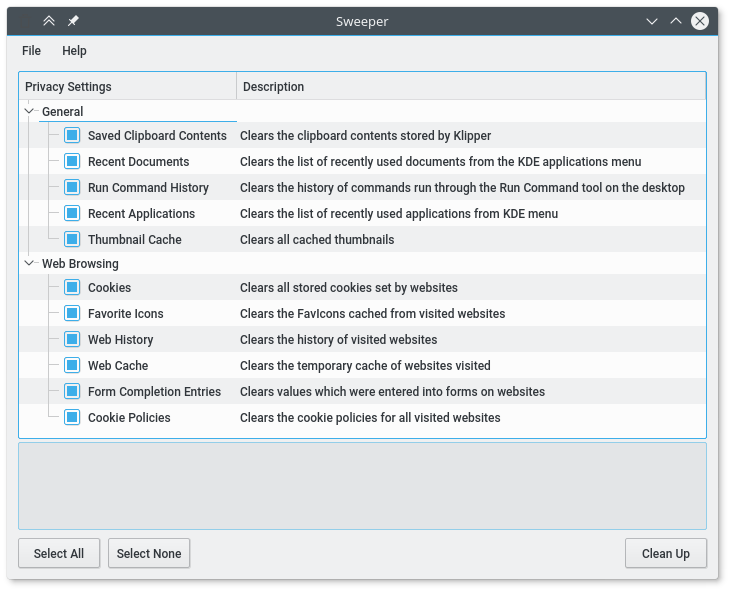
    Hier stellt sich mir die Frage wie man das macht. Der Suchbegriff "Repoliste aufräumen" ergab einen Hinweis auf KDE Sweeper.

    Sweeper
    Dienstprogramm zum Bereinigen des Systems
    apps.kde.org


    Auf meinem System habe ich es nicht gefunden, daher:

    Sollte ich dort weitermachen?

    Dasselbe mit Code tag:


    In einer anderen Diskussion wurde empfohlen nach dem Paket zu suchen, dass die Fehler verursacht hat.

    In einer anderen Diskussion wurde empfohlen nach dem Paket zu suchen, dass die Fehler verursacht hat.


    nuxubee@localhost:~> zypper lr -d

    # | Alias | Name | Enabled | GPG Check | Refresh | Priority | Type | URI

    | Serv->

    ---+--------------------------------------+----------------------------------------------------------------------+-----------+-----------------+----------------+-----------+--------+-----------------------------------------------------------------------------------------

    -+-------

    1 | Atom | Atom Editor | Ja | (r ) Ja | Nein | 99 | rpm-md | https://packagecloud.io/AtomEditor/atom/el/7/x86_64

    |

    2 | devel_languages_nodejs | Node.js (openSUSE_Tumbleweed) | Ja | (r ) Ja | Nein | 99 | rpm-md | https://download.opensuse.org/…dejs/openSUSE_Tumbleweed/

    |

    4 | https-download.opensuse.org-1e0e76ee | KDE:Frameworks5 | Ja | (r ) Ja | Ja | 99 | rpm-md | https://download.opensuse.org/…eworks5/openSUSE_Factory/

    |

    5 | https-download.opensuse.org-1f7de72a | SUSE:SLE-15-SP1:Update | Ja | ( p) Ja | Ja | 99 | NONE | https://download.opensuse.org/…1:/Update/pool-leap-15.4/

    |

    6 | https-download.opensuse.org-2d23bc65 | SUSE:SLE-15-SP4:GA | Ja | ( p) Ja | Ja | 99 | NONE | https://download.opensuse.org/…E-15-SP4:/GA/toberemoved/

    |

    10 | https-download.opensuse.org-5b52d390 | home:phoenix.os:playmarket | Ja | (r ) Ja | Ja | 99 | rpm-md | https://download.opensuse.org/…enix.os:/playmarket/15.4/

    |

    7 | https-download.opensuse.org-31d8aa81 | SUSE:SLE-15-SP2:Update | Ja | ( p) Ja | Ja | 99 | NONE | https://download.opensuse.org/…2:/Update/pool-leap-15.4/

    |

    3 | https-download.opensuse.org-052a5045 | openSUSE:Backports:SLE-15-SP4 | Ja | (r ) Ja | Ja | 99 | rpm-md | https://download.opensuse.org/…rts:/SLE-15-SP4/standard/

    |

    12 | https-download.opensuse.org-91b6d931 | SUSE:SLE-15-SP3:Update | Ja | ( p) Ja | Ja | 99 | NONE | https://download.opensuse.org/…3:/Update/pool-leap-15.4/

    |

    8 | https-download.opensuse.org-3497cff6 | SUSE:SLE-15-SP3:GA | Ja | ( p) Ja | Ja | 99 | NONE | https://download.opensuse.org/…USE:/SLE-15-SP3:/GA/pool/

    |

    11 | https-download.opensuse.org-6780a19e | SUSE:SLE-15-SP2:GA | Ja | ( p) Ja | Ja | 99 | NONE | https://download.opensuse.org/…USE:/SLE-15-SP2:/GA/pool/

    |

    9 | https-download.opensuse.org-442477d3 | SUSE:SLE-15-SP1:GA | Ja | ( p) Ja | Ja | 99 | NONE | https://download.opensuse.org/…USE:/SLE-15-SP1:/GA/pool/

    |

    13 | https-download.opensuse.org-bdf7456b | home:kLeZ-hAcK | Ja | (r ) Ja | Ja | 99 | rpm-md | https://download.opensuse.org/…ies/home:/kLeZ-hAcK/15.4/

    |

    14 | https-download.opensuse.org-cc7f8e9a | SUSE:SLE-15:Update | Ja | ( p) Ja | Ja | 99 | NONE | https://download.opensuse.org/…5:/Update/pool-leap-15.4/

    |

    15 | https-download.opensuse.org-f8f67e9b | SUSE:SLE-15-SP1:GA | Ja | ( p) Ja | Ja | 99 | NONE | https://download.opensuse.org/…USE:/SLE-15-SP1:/GA/pool/

    |

    16 | openSUSE-Leap-15.3-2 | openSUSE-Leap-15.3-2 | Ja | (r ) Ja | Nein | 99 | rpm-md | cd:/?devices=/dev/disk/by-id/ata-ATAPI_iHDS118_5

    |

    17 | repo-backports-debug-update | Update repository of openSUSE Backports (Debug) | Nein | ---- | ---- | 99 | NONE | http://download.opensuse.org/u…eap/15.3/backports_debug/

    |

    18 | repo-backports-update | Update repository of openSUSE Backports | Ja | (r ) Ja | Ja | 99 | rpm-md | http://download.opensuse.org/update/leap/15.3/backports/

    |

    19 | repo-debug | Debug Repository | Nein | ---- | ---- | 99 | NONE | http://download.opensuse.org/d…ution/leap/15.3/repo/oss/

    |

    20 | repo-debug-non-oss | Debug Repository (Non-OSS) | Nein | ---- | ---- | 99 | NONE | http://download.opensuse.org/d…n/leap/15.3/repo/non-oss/

    |

    21 | repo-debug-update | Update Repository (Debug) | Nein | ---- | ---- | 99 | NONE | http://download.opensuse.org/debug/update/leap/15.3/oss/

    |

    22 | repo-debug-update-non-oss | Update Repository (Debug, Non-OSS) | Nein | ---- | ---- | 99 | NONE | http://download.opensuse.org/debug/update/leap/15.3/non-oss/

    |

    23 | repo-non-oss | Non-OSS Repository | Ja | (r ) Ja | Ja | 99 | rpm-md | http://download.opensuse.org/d…n/leap/15.3/repo/non-oss/

    |

    24 | repo-oss | Main Repository | Ja | (r ) Ja | Ja | 99 | rpm-md | http://download.opensuse.org/d…ution/leap/15.3/repo/oss/

    |

    25 | repo-sle-debug-update | Update repository with updates from SUSE Linux Enterprise 15 (Debug) | Nein | ---- | ---- | 99 | NONE | http://download.opensuse.org/debug/update/leap/15.3/sle/

    |

    26 | repo-sle-update | Update repository with updates from SUSE Linux Enterprise 15 | Ja | (r ) Ja | Ja | 99 | rpm-md | http://download.opensuse.org/update/leap/15.3/sle/

    |

    27 | repo-source | Source Repository | Nein | ---- | ---- | 99 | NONE | http://download.opensuse.org/s…ution/leap/15.3/repo/oss/

    |

    28 | repo-update | Main Update Repository | Ja | (r ) Ja | Ja | 99 | rpm-md | http://download.opensuse.org/update/leap/15.3/oss/

    |

    29 | repo-update-non-oss | Update Repository (Non-Oss) | Ja | (r ) Ja | Ja | 99 | rpm-md | http://download.opensuse.org/update/leap/15.3/non-oss/

    |

    Nach einem Update hat sich bei mir ergeben, dass KDE keine Favoriten und Anwendungen mehr hat.

    Nach Klick auf das Chameleon erscheint der Bereich Favoriten und Anwendungen einfach völlig leer. :smilie_pc_012:


    Dasselbe gilt für die Suche mit CTRL-F2: Dort sind keine Anwendungen zu finden. Insbesondere hat mir gefehlt: konsole und dolphin, die dort eigentlich standardmäßig eingetragen sind. Durch einen kleinen Umweg (via kate) lassen sich diese Ressourcen zwar immer noch starten, jedoch suche ich nun einen Weg KDE zu reparieren!


    Evtl. anderes Problem: CTRL-ALT-F2 bringt das virtuelle Terminal, dort kann ich mich aber nicht anmelden. Rückkehr mit ALT-F7 war noch möglich.


    nuxubee@localhost:~/Schreibtisch> uname -a

    Linux localhost.localdomain 5.3.18-150300.59.90-default #1 SMP Tue Aug 9 08:49:53 UTC 2022 (127973b) x86_64 x86_64 x86_64 GNU/Linux

    nuxubee@localhost:~/Schreibtisch> plasmashell --version

    Invalid MIT-MAGIC-COOKIE-1 keyplasmashell 5.18.6


    Wie kann man KDE reparieren?

    Hallo, zur Zeit gelingt es mir nicht mehr eine Verbindung zum Internet aufzubauen. Meine Linux Installation existiert schon eine Weile und musste jetzt geändert werden da der USB-WLAN-Stick erneuert werden musste. Der neue Plan ist es mit einem TP-Link AC600 Archer T2U Nano eine Verbindung zum Speedport herzustellen. Aber das klappt erstmal nicht so einfach.


    nuxubee@localhost:~> lsusb

    Bus 010 Device 008: ID 090c:1000 Silicon Motion, Inc. - Taiwan (formerly Feiya Technology Corp.) Flash Drive

    Bus 010 Device 004: ID 05e3:0608 Genesys Logic, Inc. Hub

    Bus 010 Device 001: ID 1d6b:0002 Linux Foundation 2.0 root hub

    Bus 006 Device 001: ID 1d6b:0001 Linux Foundation 1.1 root hub

    Bus 005 Device 005: ID 046d:c318 Logitech, Inc. Illuminated Keyboard

    Bus 005 Device 004: ID 046d:c24e Logitech, Inc. G500s Laser Gaming Mouse

    Bus 005 Device 001: ID 1d6b:0001 Linux Foundation 1.1 root hub

    Bus 004 Device 001: ID 1d6b:0001 Linux Foundation 1.1 root hub

    Bus 007 Device 002: ID 2357:011e TP-Link AC600 wireless Realtek RTL8811AU [Archer T2U Nano]

    Bus 007 Device 001: ID 1d6b:0002 Linux Foundation 2.0 root hub

    Bus 003 Device 001: ID 1d6b:0001 Linux Foundation 1.1 root hub

    Bus 002 Device 001: ID 1d6b:0001 Linux Foundation 1.1 root hub

    Bus 001 Device 001: ID 1d6b:0001 Linux Foundation 1.1 root hub

    Bus 009 Device 001: ID 1d6b:0003 Linux Foundation 3.0 root hub

    Bus 008 Device 001: ID 1d6b:0002 Linux Foundation 2.0 root hub

    nuxubee@localhost:~> uname -a

    Linux localhost 5.3.18-150300.59.60-default #1 SMP Fri Mar 18 18:37:08 UTC 2022 (79e1683) x86_64 x86_64 x86_64 GNU/Linux

    nuxubee@localhost:~>


    yast ist auch erfolglos trotz Ethernetkabel zum Port LAN1 des Speedport. Was könnte man noch probieren?