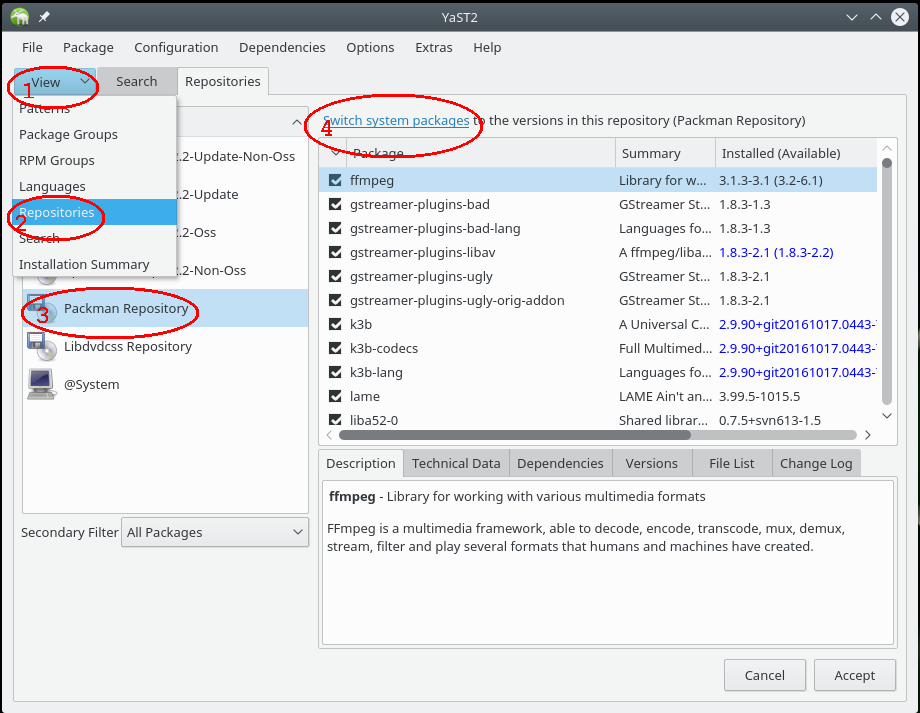
Hier die üblichen Infos. Ich hoffe, ihr habt noch eine Idee?
Code
Code
marcel@linux:/mnt/data> sudo zypper se -si vlc gstreamer
[sudo] Passwort für root: Repository-Daten werden geladen...
Installierte Pakete werden gelesen...

S  | Name                              | Type  | Version            | Arch   | Repository
---+-----------------------------------+-------+--------------------+--------+-------------------
i+ | gstreamer                         | Paket | 1.20.1-150400.1.5  | x86_64 | Haupt-Repository
i  | gstreamer-32bit                   | Paket | 1.20.1-150400.1.5  | x86_64 | Haupt-Repository
i+ | gstreamer-lang                    | Paket | 1.20.1-150400.1.5  | noarch | Haupt-Repository
i  | gstreamer-libnice                 | Paket | 0.1.18-150400.1.14 | x86_64 | Haupt-Repository
i+ | gstreamer-plugins-bad             | Paket | 1.20.1-lp154.1.1   | x86_64 | Haupt-Repository
i+ | gstreamer-plugins-bad-chromaprint | Paket | 1.20.1-lp154.1.1   | x86_64 | Haupt-Repository
i+ | gstreamer-plugins-bad-codecs      | Paket | 1.20.1-pm154.2.3   | x86_64 | Packman Repository
i+ | gstreamer-plugins-bad-fluidsynth  | Paket | 1.20.1-lp154.1.1   | x86_64 | Haupt-Repository
i  | gstreamer-plugins-bad-lang        | Paket | 1.20.1-lp154.1.1   | noarch | Haupt-Repository
i+ | gstreamer-plugins-base            | Paket | 1.20.1-150400.1.9  | x86_64 | Haupt-Repository
i+ | gstreamer-plugins-base-lang       | Paket | 1.20.1-150400.1.9  | noarch | Haupt-Repository
i+ | gstreamer-plugins-good            | Paket | 1.20.1-150400.1.6  | x86_64 | Haupt-Repository
i+ | gstreamer-plugins-good-gtk        | Paket | 1.20.1-150400.1.6  | x86_64 | Haupt-Repository
i+ | gstreamer-plugins-good-lang       | Paket | 1.20.1-150400.1.6  | noarch | Haupt-Repository
i+ | gstreamer-plugins-libav           | Paket | 1.20.1-bp154.1.48  | x86_64 | Haupt-Repository
i+ | gstreamer-plugins-ugly            | Paket | 1.20.1-150400.1.7  | x86_64 | Haupt-Repository
i+ | gstreamer-plugins-ugly-codecs     | Paket | 1.20.1-pm154.1.4   | x86_64 | Packman Repository
i  | gstreamer-plugins-ugly-lang       | Paket | 1.20.1-150400.1.7  | noarch | Haupt-Repository
i+ | libgstreamer-1_0-0                | Paket | 1.20.1-150400.1.5  | x86_64 | Haupt-Repository
i  | libgstreamer-1_0-0-32bit          | Paket | 1.20.1-150400.1.5  | x86_64 | Haupt-Repository
i+ | libvlc5                           | Paket | 3.0.18-pm154.2.5.1 | x86_64 | Packman Repository
i+ | libvlccore9                       | Paket | 3.0.18-pm154.2.5.1 | x86_64 | Packman Repository
i+ | PackageKit-gstreamer-plugin       | Paket | 1.2.4-150400.1.11  | x86_64 | Haupt-Repository
i+ | phonon4qt5-backend-gstreamer      | Paket | 4.10.0-bp154.1.48  | x86_64 | Haupt-Repository
i+ | phonon4qt5-backend-gstreamer-lang | Paket | 4.10.0-bp154.1.48  | noarch | Haupt-Repository
i+ | vlc                               | Paket | 3.0.18-pm154.2.5.1 | x86_64 | Packman Repository
i+ | vlc-codec-gstreamer               | Paket | 3.0.18-pm154.2.5.1 | x86_64 | Packman Repository
i  | vlc-codecs                        | Paket | 3.0.18-pm154.2.5.1 | x86_64 | Packman Repository
i+ | vlc-lang                          | Paket | 3.0.18-pm154.2.5.1 | noarch | Packman Repository
i+ | vlc-noX                           | Paket | 3.0.18-pm154.2.5.1 | x86_64 | Packman Repository
i+ | vlc-qt                            | Paket | 3.0.18-pm154.2.5.1 | x86_64 | Packman Repository
i+ | vlc-vdpau                         | Paket | 3.0.18-pm154.2.5.1 | x86_64 | Packman Repository
Alles anzeigen
Code
Code
zypper lr -d
#  | Alias                                | Name                                                                                        | Enabled   | GPG Check       | Refresh        | Priority  | Type     | URI                                                                                  | Serv->
---+--------------------------------------+---------------------------------------------------------------------------------------------+-----------+-----------------+----------------+-----------+----------+--------------------------------------------------------------------------------------+------- 1 | Download | Download | Ja | ( p) Ja | Ja | 99 | plaindir | dir:/home/marcel/Downloads | 2 | http-ftp.gwdg.de-21c73751 | Packman Repository | Ja | (r ) Ja | Ja | 60 | rpm-md | http://ftp.gwdg.de/pub/linux/misc/packman/suse/openSUSE_Leap_15.4/ | 3 | http-opensuse-guide.org-8b215306 | libdvdcss repository | Ja | (r ) Ja | Ja | 99 | rpm-md | http://opensuse-guide.org/repo/openSUSE_Leap_15.4/ | 4 | https-download.opensuse.org-e59f5519 | openSUSE:Backports:SLE-15-SP4 | Nein | ---- | ---- | 99 | rpm-md | https://download.opensuse.org/repositories/openSUSE:/Backports:/SLE-15-SP4/standard/ | 5 | openSUSE-Leap-15.4-1 | openSUSE-Leap-15.4-1 | Nein | ---- | ---- | 99 | rpm-md | hd:/?device=/dev/disk/by-id/usb-VendorCo_ProductCode_8135111166343061599-0:0-part2 | 6 | repo-backports-debug-update | Update repository with updates for openSUSE Leap debuginfo packages from openSUSE Backports | Nein | ---- | ---- | 99 | NONE | http://download.opensuse.org/update/leap/15.4/backports_debug/ | 7 | repo-backports-update | Update repository of openSUSE Backports | Ja | (r ) Ja | Ja | 99 | rpm-md | http://download.opensuse.org/update/leap/15.4/backports/ | 8 | repo-debug | Debug Repository | Nein | ---- | ---- | 99 | NONE | http://download.opensuse.org/debug/distribution/leap/15.4/repo/oss/ | 9 | repo-debug-non-oss | Debug Repository (Non-OSS) | Nein | ---- | ---- | 99 | NONE | http://download.opensuse.org/debug/distribution/leap/15.4/repo/non-oss/ | 10 | repo-debug-update | Update Repository (Debug) | Nein | ---- | ---- | 99 | NONE | http://download.opensuse.org/debug/update/leap/15.4/oss/ | 11 | repo-debug-update-non-oss | Update Repository (Debug, Non-OSS) | Nein | ---- | ---- | 99 | NONE | http://download.opensuse.org/debug/update/leap/15.4/non-oss/ | 12 | repo-non-oss | Non-OSS Repository | Ja | (r ) Ja | Ja | 99 | rpm-md | http://download.opensuse.org/distribution/leap/15.4/repo/non-oss/ | 13 | repo-oss | Haupt-Repository | Ja | (r ) Ja | Ja | 99 | rpm-md | http://download.opensuse.org/distribution/leap/15.4/repo/oss/ | 14 | repo-sle-debug-update | Update repository with debuginfo for updates from SUSE Linux Enterprise 15 | Nein | ---- | ---- | 99 | NONE | http://download.opensuse.org/debug/update/leap/15.4/sle/ | 15 | repo-sle-update | Update repository with updates from SUSE Linux Enterprise 15 | Ja | (r ) Ja | Ja | 99 | rpm-md | http://download.opensuse.org/update/leap/15.4/sle/ | 16 | repo-source | Source Repository | Nein | ---- | ---- | 99 | NONE | http://download.opensuse.org/source/distribution/leap/15.4/repo/oss/ | 17 | repo-update | Hauptaktualisierungs-Repository | Ja | (r ) Ja | Ja | 99 | rpm-md | http://download.opensuse.org/update/leap/15.4/oss | 18 | repo-update-non-oss | Aktualisierungs-Repository (Nicht-Open-Source-Software) | Ja | (r ) Ja | Ja | 99 | rpm-md | http://download.opensuse.org/update/leap/15.4/non-oss/ | 19 | teamviewer | TeamViewer - x86_64 | Ja | (r ) Ja | Ja | 99 | rpm-md | https://linux.teamviewer.com/yum/stable/main/binary-x86_64/ |